Fashion Coloring Book for Girls: A Practical Resource for Creators, Educators, and Entrepreneurs
A Fashion Coloring Book for Girls is more than a collection of line art—it’s a production-ready asset designed for integration into real-world creative and commercial workflows. Whether you’re launching a KDP coloring book, building a digital product bundle, designing classroom materials, or developing branded content for young audiences, this interior package delivers structured, high-fidelity files that reduce setup time and increase output quality.
How It Fits Into Your Creative or Business Workflow
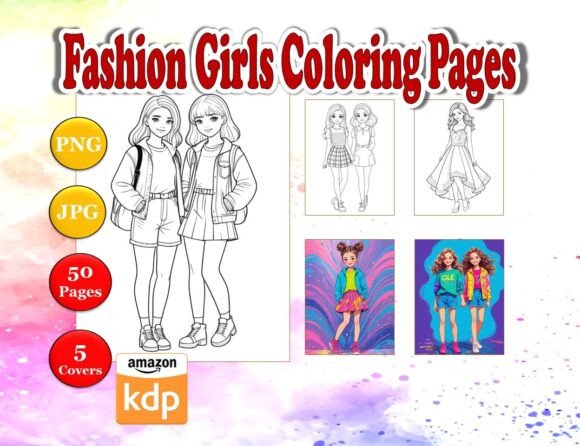
This interior set—featuring 50 unique girls’ outfit coloring pages—is built for immediate use in multiple stages of a project lifecycle. Before publishing, it serves as a vetted, print-optimized foundation: all pages are A4 (8.5″ x 11″) with full bleed, eliminating guesswork around margins or cropping. During development, the inclusion of three file formats—PNG, JPG, and PDF—allows seamless switching between platforms: PNGs retain transparency for layered editing in Canva or Photoshop; JPGs load quickly in email campaigns or social previews; and the consolidated PDF streamlines proofing and printer handoff.
After launch, the flexibility supports iteration without rework. Because each file is individually named and organized, swapping a single page for seasonal updates—or resizing one illustration to fit a custom workbook layout—takes seconds, not hours. That modularity matters when managing multiple SKUs, running A/B tests on cover variants, or adapting content for different age brackets (e.g., simplifying lines for younger kids or adding texture cues for adults).
Integration With Common Tools and Platforms
You don’t need specialized software to begin. The files work natively with widely adopted tools:
- KDP Direct Upload: The PDF interior meets Amazon’s exact specifications—no scaling, no warnings. Bleed is pre-applied, and resolution is 300 DPI at full size, satisfying KDP’s print requirements out of the box.
- Canva & Adobe Express: PNG files preserve clean edges and transparent backgrounds, letting you overlay text, add branding, or composite scenes without background cleanup.
- Learning Management Systems (LMS): Educators can drop JPGs directly into Google Classroom or Seesaw as printable or interactive assignments—no conversion needed.
- Email Marketing & Social Previews: Lightweight JPGs load reliably in Mailchimp templates or Instagram carousels, supporting visual storytelling before the full product launches.
Compatibility extends beyond software. The consistent A4 sizing means these pages integrate cleanly with standard binders, laminators, and school supply kits—making them viable for after-school programs, therapy sessions, or pop-up retail displays where physical handling is part of the experience.
Preparation and Quality Control
Before importing into your workflow, verify two practical checkpoints:
- File naming consistency: Each of the 50 files follows a logical sequence (e.g., “fashion-girl-01.png”, “fashion-girl-02.png”). This avoids misalignment during batch uploads or automated formatting scripts—especially critical if you’re generating multiple versions (e.g., grayscale-only editions or bilingual overlays).
- Bleed verification: Though applied, always open one page in a PDF viewer zoomed to 100% and confirm that key design elements extend fully to the edge. This prevents accidental white borders during trim—a common cause of customer complaints in print-on-demand.
For long-term use, store the original ZIP archive separately from working copies. Rename edited files with version tags (e.g., “fashion-girl-07_v2-resized.jpg”) rather than overwriting originals. This preserves fidelity for future repurposing—say, extracting a single dress outline for a textile design course or converting a pose into SVG for Cricut projects.
Real-World Implementation Examples
For KDP Publishers: Use the 5 included colored cover pages as inspiration—but don’t stop there. Swap one outfit illustration onto a new background, adjust the color palette using HSL sliders in Lightroom, and generate five distinct covers in under 20 minutes. Pair each with targeted backend keywords (“stylish outfits coloring pages for girls”, “pretty girls coloring pages for adults”) to diversify discoverability without duplicating interior content.
For Educators: Print select pages at 75% scale and bind them into personalized “Style Journal” booklets for art units on fashion history or cultural dress. Add reflection prompts in the margins (“What fabrics would this outfit need in winter?”) using the editable PDF layer—no design skills required.
For Freelance Designers: License the PNGs as base assets for client work. A boutique children’s brand might commission you to adapt three pages into animated stickers for their app. Because outlines are crisp and vector-friendly, tracing into SVG adds minimal overhead—and the original files remain royalty-free for your portfolio.
For Small Business Owners: Bundle the 50 JPGs with a short video tutorial (“How to Host a Fashion-Themed Coloring Party”) and sell it as a digital party kit. The ready-to-print format means parents download once and host immediately—increasing perceived value while keeping fulfillment frictionless.
Efficiency, Consistency, and Long-Term Usability
The value compounds over time. Unlike single-use illustrations, this set is engineered for reuse across contexts. A page showing a girl in a ballet outfit works equally well in a dance studio newsletter, a physical therapy worksheet on posture, or a mindfulness activity about body awareness. That cross-context utility reduces the need to source new art for every initiative.
Consistency is embedded—not just visually (same lineweight, balanced negative space, age-appropriate proportions), but structurally. Every file shares identical dimensions, resolution, and naming logic. That predictability accelerates bulk operations: dragging 50 PNGs into a folder and applying a batch resize in XnConvert takes less than a minute. No manual checking per file.
For ongoing projects, treat the set as a living library. Tag files in your digital asset manager with metadata like “age-range: 6–12”, “theme: career”, or “complexity: medium”. Over six months, you’ll build a searchable index that surfaces the right illustration for any brief—without scrolling through hundreds of unsorted downloads.
What to Do Next—Without Overcomplicating
Start small. Pick one use case aligned with your current priority: if you’re preparing a KDP upload, open the PDF and run it through Kindle Previewer. If you’re planning a workshop, print pages 12, 23, and 41—they feature varied silhouettes and accessory detail ideal for group discussion. If you’re evaluating commercial potential, test one JPG in a low-cost Facebook ad targeting “coloring book creators” and measure click-through rate to your landing page.
Avoid trying to optimize everything at once. You don’t need to edit all 50 files before launch. You don’t need to master every format before choosing one. The strength of this Fashion Coloring Book for Girls interior lies in its readiness—not perfection. It’s built so you spend less time prepping assets and more time executing ideas that move your goals forward.
When your workflow values speed without sacrificing quality, when your audience expects polish but won’t wait for it, and when your calendar doesn’t allow for weeks of illustration sourcing—this is the kind of resource that quietly lifts baseline performance. Not by replacing skill or strategy, but by removing avoidable friction from the path between intention and delivery.