Beautiful Zentangle Coloring Pages: A Practical Asset for Creators, Publishers, and Product-Based Entrepreneurs
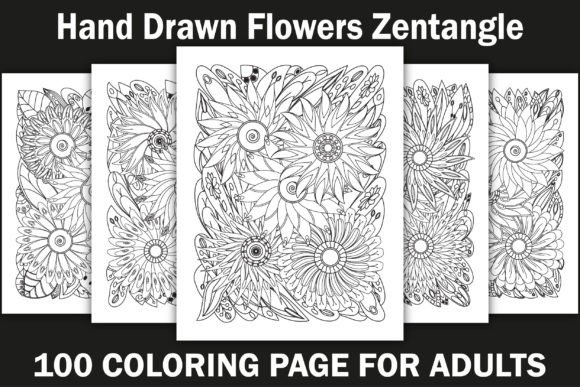
Beautiful Zentangle Coloring Pages aren’t just decorative line art—they’re a functional, production-ready resource designed to integrate seamlessly into real-world creative and business workflows. Whether you’re building a low-overhead Amazon KDP coloring book, developing print-on-demand (POD) stationery, designing custom book covers, or sourcing high-quality interiors for educational or therapeutic materials, this bundle serves as a foundational asset—not an afterthought.
How It Fits Into Your Production Pipeline
For Amazon KDP publishers, time-to-market and interior consistency are critical. This 100 Flowers Adult Coloring Page Bundle eliminates the bottleneck of sourcing, vetting, and formatting individual illustrations. Each design is hand-drawn—no AI-generated repetition, no licensing ambiguity—and delivered in three complementary formats: EPS (fully editable), PNG (transparent background, ideal for layered mockups), and JPEG (print-ready, CMYK-friendly). That means you can import directly into InDesign or Affinity Publisher without re-tracing, adjust line weights in Illustrator before export, or drop PNGs into Canva templates for social previews—all within the same day.
Unlike generic clipart packs, these pages were created with commercial publishing in mind. Every illustration is sized to A4 (8.5″ × 11″), optimized for bleed-safe printing, and rendered at 300 DPI. There’s no need to scale up from low-res web assets or manually crop misaligned canvases—your interior layout workflow starts clean and stays efficient.
Before You Publish: Preparation That Saves Hours
Preparation begins the moment you download the files—not when you open your layout software. Start by organizing your assets in a logical folder structure: /EPS/for-editing, /PNG/for-mockups, /JPEG/for-print. Tag each file with descriptive names (e.g., Flower_043_Zentangle_Lily_Editable.eps) rather than relying on auto-numbered sequences. This simple step prevents version confusion later—especially when iterating across multiple KDP titles or POD variants.
Test compatibility early. Open one EPS file in your vector editor to confirm layers, paths, and stroke attributes render as expected. If you use Adobe Illustrator, check that strokes are not outlined and remain editable. If you’re using Affinity Designer or CorelDRAW, verify that clipping masks and compound paths translate cleanly. A five-minute test now avoids hours of troubleshooting during final export.
During Layout: Consistency Without Compromise
Consistency isn’t about uniformity—it’s about intentional variation within a controlled framework. These 100 hand-drawn flowers offer natural diversity in composition (tight mandalas, loose botanical arrangements, asymmetrical vines) while maintaining shared visual grammar: balanced negative space, rhythmic linework, and tangle-based repetition that invites focus without overwhelming. That makes them ideal for curated spreads where pacing matters—like alternating dense florals with breathing-room pages in a 120-page adult coloring book.
When building your KDP interior, avoid randomizing page order. Group by complexity: place simpler florals (fewer intersecting lines, open centers) near the front for accessibility; reserve intricate zentangle hybrids (layered petals + geometric fill patterns) for mid-to-late sections. Readers notice flow—even subconsciously—and thoughtful sequencing increases completion rates and positive reviews.
After Publishing: Extending Value Beyond the First Sale
Your investment doesn’t expire at upload. Because all 100 designs are delivered in editable EPS format, you retain full control over reuse and adaptation. Need a matching journal cover? Extract a single bloom, recolor it, and scale it to fit a 6″ × 9″ spine. Launching a seasonal collection? Swap out five floral motifs for holiday-themed variants—keeping the rest of your interior intact. Even educators or therapists can repurpose individual pages as standalone handouts, adjusting line weight for younger users or adding guided prompts in editable layers.
This flexibility also supports A/B testing. Run two versions of the same KDP title—one with original flower placements, another with rearranged sequence—and measure engagement via Amazon’s “Page Flip” analytics or backend conversion data. Real-world feedback informs future bundles, not guesswork.
Integration With Other Tools and Platforms
The bundle works natively with industry-standard tools—but integration depth depends on how you map it to your stack. For example:
- KDP Interior Workflow: Import JPEGs directly into Kindle Create or drag PNGs into Vellum’s interior builder. Use EPS files to generate alternate black-and-white or grayscale versions for accessibility-focused editions.
- POD Ecosystems: Upload PNGs to Printful or Gelato for greeting cards or notebooks; their automated cropping respects transparent backgrounds, preserving design integrity.
- Marketing & Social: Convert select PNGs to animated SVGs for Instagram carousels or use high-res JPEGs in Pinterest pins—line art performs exceptionally well in visual search due to clarity and contrast.
- Educational Use: Import EPS files into Google Slides or PowerPoint to annotate techniques (e.g., “Here’s where the tangle pattern repeats”)—ideal for live workshops or recorded tutorials.
Quality Control and Long-Term Usability
Hand-drawn doesn’t mean inconsistent. Each of the 100 flowers was reviewed for stroke continuity, anchor point cleanliness, and scalable geometry—ensuring no jagged edges appear when zoomed or printed large. But quality control continues on your end: always export final PDFs with embedded fonts (if adding text) and preserve vector data where possible. Avoid flattening layers unless required by your printer—keeping them intact allows rapid updates if Amazon changes KDP’s margin or bleed requirements.
Long-term usability hinges on metadata and backup discipline. Embed copyright info and license terms into XMP fields of your master EPS files. Store backups in at least two locations (local drive + cloud), and update version numbers when making edits (e.g., Flower_077_v2_ColoredBackground.eps). This protects your IP and streamlines audits—especially if scaling to multiple KDP titles or collaborating with editors or designers.
Realistic Implementation Tips for Busy Professionals
You don’t need to use all 100 pages at once. Start small: pick 25 high-contrast florals for your first KDP launch. Use them to build a cohesive 60-page interior, then expand with themed sequels (e.g., “Botanical Borders” or “Zentangle Vines”). Track which designs get the most saves or shares on Pinterest—those become your next bestsellers.
If you're a freelancer sourcing assets for clients, position this bundle as a time-saving upgrade—not just “more pages,” but “faster turnaround, consistent quality, and full edit rights.” That justifies premium pricing and reduces revision rounds.
And if you're a hobbyist building your first print-on-demand shop? Prioritize usability over perfection. Use the JPEGs as-is for your first batch. Learn the editing workflow later—when demand validates the effort.
Beautiful Zentangle Coloring Pages succeed because they respect your time, your tools, and your goals—not as standalone art, but as infrastructure for what comes next.